

TL;DR: Quality Assurance is a lifecycle function that prevents defects from being built into the product in the first place. This guide explains what QA actually does at every stage of development, why skipping it is expensive, and how non-technical founders can use it as a strategic advantage.
What Most Founders Usually Miss When Planning a Product
Most teams focus on the obvious questions first: Who's going to design it? Who's going to develop it? How do we coordinate the team? Questions that are essential but only cover part of the picture.
Even when everything looks well planned, defects will appear. They show up in the design itself, in application behavior, in the way a user story is written or interpreted. No matter how strong the process is, imperfections are part of every system and actually needed to keep learning.
Real users will make things harder because they have spontaneous actions. They skip steps, misunderstand instructions, and interact with products under conditions no test environment can replicate. A feature that works perfectly in a controlled demo can fail the moment it meets real-world usage.
And here's what most founders don't realize: a product doesn't fail only in production. It often starts much earlier with unclear requirements or overlooked edge cases that grow into critical issues by the time they reach users.
So if defects are inevitable and users are unpredictable, who's responsible for catching both before launch? That's exactly where the role of quality assurance becomes essential.
What Is QA and Why Does It Matter?
Quality assurance is the practice of ensuring a product is technically feasible and works for real people in real situations.. Think of it as a magnifying glass held over the entire development process, catching errors while they're still cheap to fix.
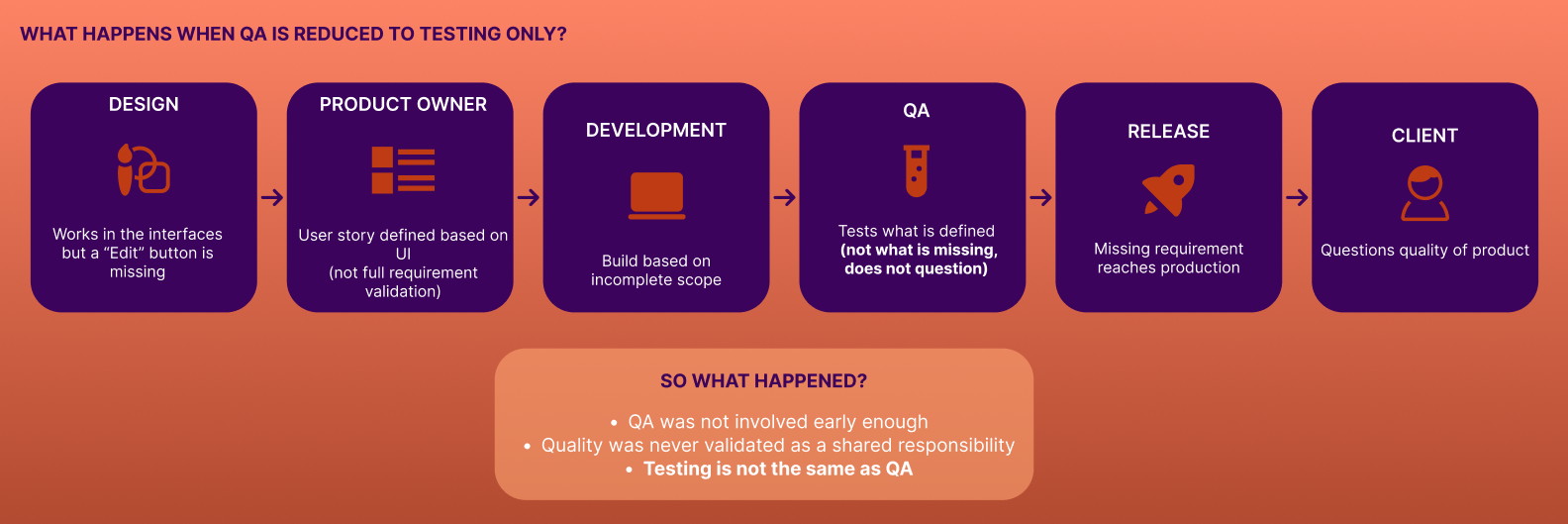
QA is commonly misunderstood as the final step where bugs get "checked." Maybe a couple of years ago, but now QA is involved throughout the entire software lifecycle, from early planning to post-release validation. So they can prevent defects from being built into the product in the first place.
For non-technical founders, the simplest way to think about it: every decision made during design, planning, and development creates an assumption. QA's job is to question those assumptions before users do.
What Does a QA Engineer Actually Do?
QA plays a key role in every stage of the development process. Here's what that looks like in practice.
During Planning: The Shift-Left Mindset
Planning is where ideas take shape into actionable work. Requirements are still flexible, which makes it the most effective and least expensive moment to catch problems. Small misunderstandings at this stage can scale into costly issues by the time they reach development.
During planning, a QA engineer starts preventing errors:
- Asking questions about unclear requirements.
- Identifies possible edge cases before they're built in.
- Highlights risks that could affect future behavior.
- Challenges assumptions before development starts.
This is where many defects are prevented before they even exist.
During Design Review
Designs communicate intent but not always behavior. What looks clear in a static mockup may not translate well into real interaction, especially across different devices, edge cases, or user conditions.
During design review, QA evaluates whether a design is visually correct and, most importantly, whether it's functional and usable in real-world scenarios. This includes flagging UI inconsistencies, poor color contrast affecting readability, missing elements implied by requirements but absent from the design, and potential usability issues that won't surface until a real user touches the product.
During Requirement Refinement
Many requirements start as vague ideas. Without proper refinement, teams implement features based on different interpretations, leading to inconsistencies, misalignment with business goals, and unnecessary rework.
Example: "The new title should be clear and intuitive." That is not a testable requirement.
QA pushes back with specific questions:
- What does "clear" mean exactly?
- How will we measure "intuitive"?
- What is the expected behavior?
These answers provide acceptance criteria that reduce ambiguity before a single line of code is written.
Test Design and Execution
This is where your plans meet real-world usage. Instead of just checking if the basic buttons work, QA looks at how the system handles real human behavior. They test what happens when users do everything right, what happens when they make mistakes, and how the system holds up under stress or weird, unexpected situations. It's all about making sure the software doesn't break just because a user did something unexpected.
Even a simple requirement like "the user should be able to register" generates multiple test cases: valid registration, invalid email format, duplicate email, and missing required fields. This ensures coverage well beyond the ideal scenario where everything goes right.
Defect Reporting
Communicating bugs effectively is what allows the team to resolve them efficiently. A poorly reported issue creates confusion and can lead to incorrect fixes.
A well-structured bug report includes a clear title, description, steps to reproduce, expected result, actual result, supporting evidence (screenshots, logs, and recordings), priority and severity rating, and assignment to the responsible developer. All of this is tracked in a bug management system, ensuring traceability and accountability across the team.
Verification and Retesting
Once a bug is fixed, QA re-executes the same steps, verifies the fix, and checks for side effects or regressions, new issues introduced as a result of the change. If the issue is resolved, the ticket closes. If not, it's reopened with new evidence.
This step is critical in complex or interconnected applications, where a fix in one area can quietly break something in another.
Demo Review
The demo is where the team presents progress to stakeholders. QA typically leads or supports the demo when all items within scope have been completed and validated. Presenting features before they've been verified increases the risk of unexpected failures during a live review, which erodes stakeholder confidence in ways that are hard to recover from.
Impact on User Stories
A user story isn't complete just because development is finished. It must meet all defined acceptance criteria and behave as expected in real scenarios. If even one acceptance criterion fails, the story is considered blocked. New defects may be identified after fixes, and retesting is required before approval.
QA ensures user stories are verified end-to-end, with the focus on correctness, consistency, and readiness.
Usability and Quality Beyond Requirements
Not everything that matters to users is written in the requirements. A button labeled "Delete" might exist and function correctly, but if the text is unreadable due to poor color contrast, that's a usability failure even if no requirement explicitly addressed contrast.
QA evaluates nonfunctional aspects, including usability, user experience, performance, and response times. The standard is, "Does it work for real people in real conditions?"
Shared Responsibility of Quality
Quality isn't owned by QA alone. Designers ensure accessibility and usability. Developers perform unit and sanity checks. Product owners validate that requirements deliver real business value. QA connects all these layers, ensuring nothing falls through the cracks and that the final product behaves as expected across every scenario.
How to Identify High-Impact Issues Before Launch
Not all defects carry the same weight. Some are visual and straightforward; others can directly affect cost, delivery timelines, and brand reputation. The most effective way to prioritize is to evaluate issues through a user-first, risk-based lens.
| Type of Issue | Example | Impact if Not Caught Early |
|---|---|---|
| Requirement gap | Missing field in a form | Rework in development, delayed release |
| UX/UI issue | Low contrast button text | Poor usability, accessibility failures |
| Ambiguous requirement | "Make the title clear and simple" | Misinterpretation, inconsistent implementation |
| Functional defect | Wrong validation logic | Data errors, broken flows in production |
| Performance issue | Slow API response | User drop-off, poor experience at scale |
Case Study: With vs. Without a QA Mindset
Without QA Involvement
A team releases a payment and checkout flow that works perfectly under normal conditions. A user selects products, applies a discount code, chooses a payment method, and completes the purchase. So far, everything looks correct.
In production, real users encounter a different experience:
- A slow response causes the user to tap pay twice… resulting in a duplicate charge
- The payment succeeds but the confirmation screen fails to load, so the user retries and gets charged again
- A discount is applied visually but not reflected in the backend calculation
- Switching between payment methods silently resets part of the order
- A session expires during checkout, but the UI gives no indication
Financial inconsistencies, duplicate transactions, user distrust, customer support overload, and direct revenue loss is the perfect recipe for a client to never use a product again. All from a feature that technically worked.
With QA Involvement Early in the Process
The same flow is analyzed and tested beyond the happy path. QA identifies the need to disable the pay button after the first click, catches inconsistencies between frontend display and backend calculations, surfaces edge cases when switching payment methods, and validates proper handling of session timeouts and transaction states.
- Resulting in a reliable transaction flow, no duplicate charges, clear user feedback at every critical step, reduced financial risk, and higher conversion rates built on user trust.
The difference is in the question each team asked.
→ One asked: "Does it work?"
→ The other asked: "Does it work for the user, in real life?"
Can AI Replace QA?
As development teams adopt AI coding tools and move faster than ever, it’s common for people to ask: can AI replace QA? The short answer is no, and understanding why matters for founders making decisions about how to staff and structure their product teams.
AI and automation speed up repetitive checks, generate test cases, and identify patterns across large datasets. However, they don't question what's missing, unclear, or risky. They have no understanding of business context, user intent, or the subtle inconsistency in a requirement that looks correct but feels wrong.
QA engineers do. They challenge assumptions and anticipate edge cases that were never explicitly documented. They advocate for the end user when something technically works but delivers a poor experience. Their judgment is built on analysis, risk assessment, and real communication.
The Designli Approach to Quality Assurance
Impact Week is where the relationship starts. Whether a founder brings a product idea or an existing build, Designli's QA team analyzes it to identify requirement gaps, usability risks, and structural assumptions that would create problems downstream.
For founders with an existing product, Impact Week often reveals the specific issues that have been silently eroding user experience or blocking growth. For founders still in the idea stage, it establishes the quality standards the build will be held to before development begins.
For founders ready to build, TractionLab is where strategy becomes a product real users pay for. The team a Product Owner, Fullstack Developer, and Engineering Lead, moves fast by design. Every user story has clear acceptance criteria before development starts, and the sprint rhythm is built around one goal: a real user inside the product by Day 30. If that milestone is missed, Month 2 is on Designli.
As the product grows and real users start depending on it for critical workflows, a dedicated QA specialist can be added to the team because at that point QAs have a major responsibility to identify issues and opportunities.
FAQs
When should QA get involved in a project?
Early, but not from day one. When you're still chasing your first user, speed matters more than perfection. Once real people are depending on your product for something that matters to them, that's when dedicated QA earns its place on the team.
Do small startups really need QA?
Especially small startups. Early-stage products often have limited resources to absorb the cost of rework, user churn from a broken experience, or reputational damage from a flawed launch.
How does QA affect launch timelines?
Done well, QA shortens launch timelines by catching issues early when they're fast and inexpensive to fix.
What does a good bug report look like?
A clear title, a description of the issue, step-by-step instructions to reproduce it, the expected result, the actual result, supporting evidence (screenshots, logs, or recordings), and a priority and severity rating.
Quality Is What Makes a Launch Succeed
QA has evolved into a non-negotiable step in development because no product is free from bugs. Once again, think of it as a magnifying glass held over the entire process; it catches errors early, which reduces the time spent on rework later and before they turn into expensive problems. QAs also ensure user stories are measurable, turning them into clear, valuable features rather than ambiguous guesses.
Adding QA to your team boosts productivity through intention. It’s strategic damage control that keeps bugs from ever reaching a live user, while also driving continuous improvements in usability, performance, and overall product quality through early feedback and iterative refinement. While every designer and developer is responsible for their own craft, QA is the enabler that has your back, identifying the show-stopping issues before they turn a launch into a negative experience. QA is the difference between a launch that just happens and a launch that actually succeeds. Schedule a consultation.


