

You don’t need to be technical to make smart decisions about your app’s architecture; however, you do need to understand the building blocks.
For non-technical SaaS founders, technical choices directly influence business outcomes. This affects whether users trust the product, how efficiently the team can scale it over time, the speed at which new features can be shipped, and whether the resulting system is secure, performant, and flexible.
This guide breaks down the three core layers of every app; frontend, backend, and infrastructure. You’ll learn what each layer does, how it impacts growth, and how to ask the right questions as a founder.
What Is the Frontend (and Why It Matters)?
The frontend is the visible part of your app; the screens, buttons, text, and interactions your users see and click. If the frontend feels clunky, confusing, or slow, it doesn’t matter how great your backend is; users will leave.
But it's more than just appearance. A strong frontend:
Shapes first impressions → Builds user trust → Reduces churn through clarity → Speeds up adoption and onboarding
Frameworks That Power Modern Interfaces
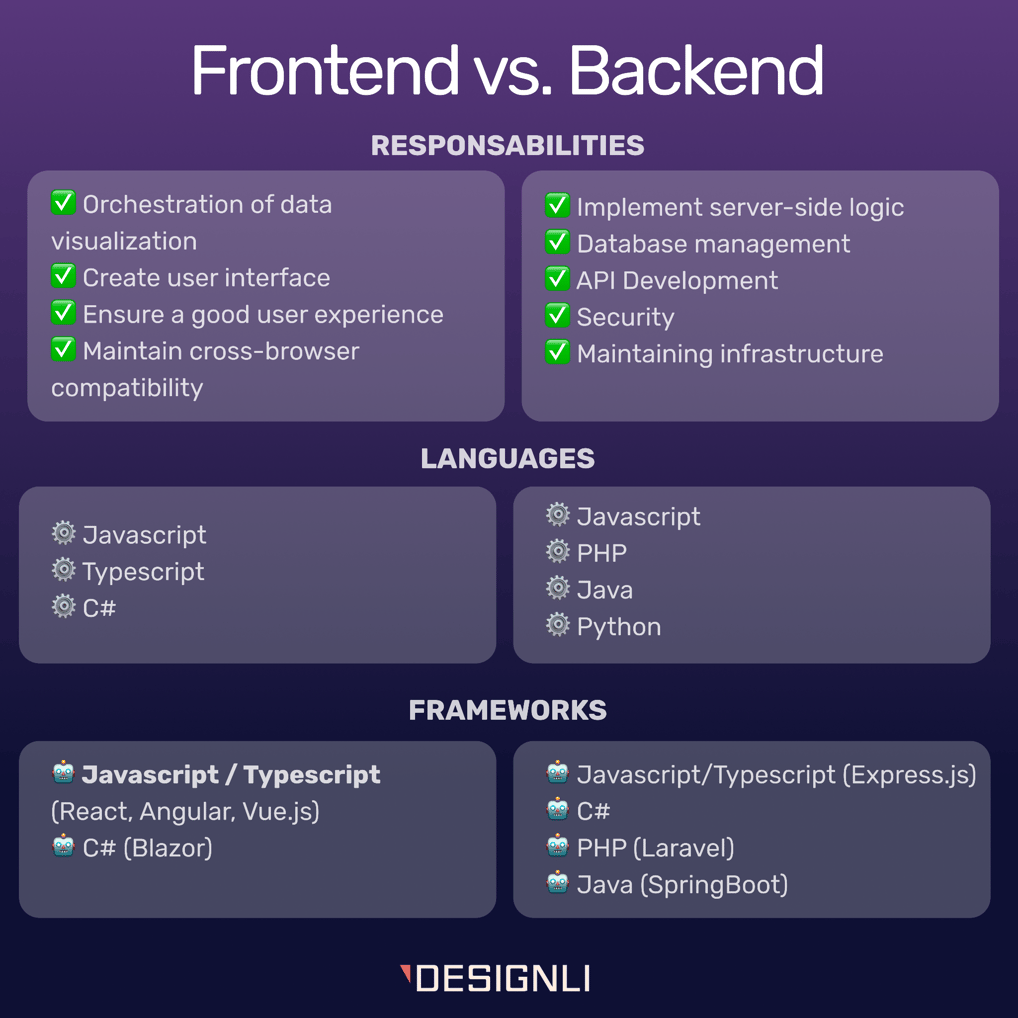
The frontend is the part of your product that users see and interact with, and frontend frameworks are the tools developers use to build that experience quickly and efficiently. Names like React, Vue, and Angular often come up in this context, and while they may sound intimidating, they all serve a similar purpose: enabling teams to create fast, consistent, and highly interactive user interfaces.
React:
- Most popular modern framework
- Massive community + talent pool
- Ideal for startups needing flexibility and scalability
Vue:
- Simple and beginner-friendly
- Great for small teams or simpler products
- Fast learning curve
Angular:
- Full-featured and opinionated
- Best for large enterprise-grade applications
- More overhead for early-stage startups
The best frontend framework is the one that aligns with your team, timeline, and hiring plan. Popular frameworks tend to reduce risk by enabling faster development and offering stronger community support. They also influence how quickly features can be delivered, how easily bugs can be fixed, and how smoothly the product can evolve.
UI/UX Considerations
A great frontend looks good and makes users feel confident when they use your product. Remember, UI (User Interface) focuses on layout, colors, buttons, and typography, while UX (User Experience) is about how intuitive and smooth the entire journey feels.
Why Users Churn Over Poor UX
Users don’t think in terms of features; they think in terms of outcomes. If something is confusing, slow, or hard to find, they’ll feel friction immediately and most likely leave.
Common UX mistakes that kill retention:
- Confusing navigation
- Inconsistent design patterns
- Poor mobile responsiveness
- Missing feedback after actions (e.g., no confirmation after clicking)
Fixing friction points in UX often leads to the fastest improvement in retention.
The real cost of UX friction in SaaS shows up in the numbers: it generates more support tickets, lowers trial-to-paid conversion, increases churn, and slows adoption within teams in B2B environments. Good UX reduces the need to explain, train, or support, allowing the product to convert and retain more efficiently.
Performance and Responsiveness
When users say an app feels “fast,” they’re not talking about server specs or code quality; they’re talking about perception. Performance in the frontend is about how quickly users see something happen after they take an action.
“Feels Fast” > “Is Fast”
Users care about how fast interactions feel, not just how fast the server actually runs. Even tiny microdelays, such as buttons that take a moment to react, can signal unreliability and make the product feel slower than it is. To counter this, using loading indicators, smooth transitions, and performance best practices helps create a stronger sense of responsiveness and perceived speed.
Why is mobile-first responsiveness non-negotiable? Most users will try your product on mobile at some point. If it:
- Feels broken
- Requires pinch-to-zoom
- Hides key buttons or menus
You will lose trust fast. Modern frontends should adapt automatically across devices. This is standard, not a bonus.
Design Systems & Frontend Tools That Accelerate Development
Modern frontend development relies on a set of tools that help teams move faster and stay consistent.
- Figma: Visual design + prototyping
- Tailwind CSS: Rapidly build consistent UI components
- Storybook: Preview + test reusable UI elements
These tools help bridge communication between designers and developers, reducing bugs and speeding up launches.
A design system is a reusable set of styles and components: buttons, modals, inputs, spacing, etc. A strong design system also makes your product easier to scale as more screens and features are added.
Design systems help products scale more smoothly by reducing chaos in the user experience. They enable faster onboarding for new developers, create a more consistent interface across features, and minimize debates about visual decisions. The key takeaway for founders is that design systems make the product feel cohesive as it grows.
What the Backend Actually Does
The backend is the unseen engine of your app, handling everything users expect to “just work.”
What it powers:
- Business logic → what happens when someone clicks a button
- Permissions → who can do what
- Transactions → saving, updating, deleting data
- User authentication → logging in, password resets
- Communication with the database and external services
Users never see the backend, but they rely on it for everything. If the frontend is the body, the backend is the brain. A weak backend = bugs, crashes, or security issues.
Popular Backend Languages (And Why They Matter to You)
You don’t need to write code, but you should understand the trade-offs behind the language powering your backend. These are the tools developers use to write the logic that powers your application, and each comes with benefits and trade-offs.
Python:
- Great for fast development
- Ideal for AI, data analytics, and API-first products
- Mature ecosystem, widely used in startups
Node.js (JavaScript):
- Same language as frontend (React, etc.)
- Good for real-time features (chat, notifications)
- Popular in startups = easier hiring
Ruby (on Rails):
- Clean, structured, fast-to-build MVPs
- Loved by early-stage devs
- Can become harder to scale at a large scale
Go:
- High-performance, built for scale
- Used in high-traffic systems (e.g., Dropbox, Uber)
- Requires more experienced engineers
You don’t need to choose the “fastest” language; pick one with strong community support, reliable tools, and easy hiring.
APIs & Integrations
Allows your product to connect with the tools your users already rely on, rather than operating in isolation. Through APIs (Application Programming Interfaces), applications commonly integrate services such as Stripe for payments, Google Maps for location features, OpenAI for AI capabilities, SendGrid for email, and Auth0 for authentication. These integrations speed up development, add powerful functionality without rebuilding from scratch, and reduce costs by leveraging proven third-party services.
However, integrations also introduce risk. External APIs can fail, change over time, or create user-facing issues when they become unstable. The founder takeaway is that your backend must be designed to handle API failures gracefully and remain adaptable as third-party tools evolve, change pricing, or are replaced.
Thinking Ahead: Choosing for Scalability
Scalability isn’t just about handling more users; it’s about handling change without requiring a complete rewrite. The backend choices you make early on can either support growth smoothly or turn into expensive bottlenecks.
Key concepts:
- Modular architecture: Organize code into clean, manageable parts
- Separation of concerns: Keep logic, data, and third-party calls isolated
- Cloud-native practices: Build for resilience, not just speed
From a business perspective, these choices result in fewer crashes and bugs, faster onboarding for new developers, and lower long-term maintenance costs. A well-structured backend makes growth cheaper, iteration easier, and strategic pivots or feature expansions far less risky.
Infrastructure: The Foundation That Keeps It All Running
What Does a Database Do?
The database is your app’s memory. It stores user accounts, transactions, settings, messages, basically anything that needs to be saved and retrieved later. When people talk about SQL vs. NoSQL, they’re talking about two different ways of organizing that information.
SQL (Structured Query Language):
- Stores data in organized tables (like spreadsheets)
- Ideal for accuracy, consistency, and relational data
- Great for financial apps, B2B SaaS, or anything with complex relationships
NoSQL:
- More flexible, stores unstructured data (like documents or key-value pairs)
- Handles rapid changes and high-volume activity well
- Used for real-time feeds, logs, or user-generated content
Changing databases later is painful and expensive. That’s why early decisions matter. The right choice sets you up for growth, performance, and reliability. The wrong one adds friction, slows development, and drives up costs. You don’t need a perfect data model on day one, but you do need to understand the shape of your data and how much consistency, scale, and speed will matter as you grow.
Deployment & Hosting Basics
Your app requires an environment to run, which is where cloud providers come in; they supply computing power, storage, and infrastructure, so you do not need to own or manage physical servers. Major providers include AWS (Amazon Web Services), which is the most widely used and highly flexible but comes with a steep learning curve; Google Cloud Platform, which is particularly strong for analytics and AI-driven applications; and Microsoft Azure, often favored for corporate and enterprise integrations.
For early-stage teams, startup-friendly platforms such as Heroku, Vercel, Render, and DigitalOcean offer simpler setups, faster launches, and lower development overhead, making them well-suited for MVPs. Simplicity matters more than flexibility when choosing tools, as well as how confidently your current team can manage it and ensure they can reduce risk and allow you to evolve your infrastructure as the product scales.
Data Security & Compliance for Startups
If your product collects user data, security and compliance must be priorities from day one. At a minimum, your development team should implement encryption for data both in transit and at rest, strong access controls so only the right people can view sensitive information, regular backups, and proper monitoring and alerting to detect issues early. Depending on your market, you may also need to align with common compliance frameworks such as GDPR in Europe for user privacy and consent, HIPAA in the United States for health data, or SOC 2. This is often required in B2B environments. The key takeaway for founders is that security is not just a technical concern; it directly affects user trust, brand reputation, and even fundraising, as investors will expect clear answers on how user data is protected.
What Founders Should Actually Do with This Info
As a founder, you are the strategist, not the architect. You do not need to write code, configure servers, or select frameworks line by line; however, you do need to set the direction for how technology supports the business. That requires understanding how technical decisions influence speed to market, scalability, hiring, and team structure, and ultimately user experience and retention. Your role is not to provide technical answers but to ask the right questions that lead to better long-term outcomes.
Think of this information as your backlog. Understanding these fundamentals will help you make more efficient decisions. Here’s what good guidance looks like from a founder who asks the right questions:
Frontend → How fast can users complete key actions?
Backend → How will we adapt if we grow 10x next year?
Infrastructure → Are we using tools the team can scale with?
By staying focused on user outcomes and business goals, you lead more effectively and avoid tech debt traps or wrong-fit platforms.
Designli’s Approach
At Designli, we don’t just “build apps”; we help founders make confident, strategic decisions across every layer of product development. Our dedicated teams are assembled to guide you through every step of the process. We take pride in developing projects that have a clear roadmap and evolution.
The SolutionLab
With the SolutionLab, you get a one-week sprint that delivers a fully interactive prototype tailored to your idea: clickable, testable, and ready to share with co-founders, investors, and early users. It includes four design review meetings, where key stakeholders can provide input on the prototype process, including user interfaces, features, and functionality defined in the product workshops.
Through a structured discovery process, you walk away with a clear roadmap: what we’re building, why it matters, and how it will scale.
Frontend & UX
We prioritize clarity, responsiveness, and intuitive UX in every product interface. To achieve this, frontend frameworks are selected to balance speed and flexibility, such as React, while mobile-first, accessible design principles are embedded from the start. Prototypes are tested early to validate user flow and usability before heavy development begins. The result is a product users do not just see, but trust.
Backend & Integrations
Our backend approach focuses on stability today while preserving flexibility for the future. We build modular, well-documented codebases that support long-term growth, integrate APIs thoughtfully to reduce fragility and simplify operations, and design architectures that can evolve alongside your business model. By thinking beyond the MVP, we ensure your technical foundation can reliably support future features, increased user demand, and strategic pivots.
Infrastructure That Matches Your Stage
From early-stage prototypes to investor-ready platforms, we tailor infrastructure decisions to match your current goals and future direction. We favor lightweight deployments that enable fast iteration, while embedding security best practices such as encryption, access control, and backups from the outset. As the product matures, we align scalable cloud platforms with your team’s capabilities and operational needs.
FAQs
What’s the difference between frontend and backend in an app?
The frontend is what users see and interact with, including the layout, buttons, and experience. The backend is what powers that experience: logic, databases, permissions, and integrations. Think of the frontend as the interface and the backend as the engine.
What’s more important, frontend performance or backend performance?
Both matter, but users feel frontend performance first. A fast, responsive interface builds trust and increases conversion. That said, backend stability is what keeps your app secure, scalable, and functional. Good UX without good logic won’t go far, and vice versa.
What should I know about APIs and integrations as a founder?
APIs connect your product to third-party services (like Stripe, OpenAI, or Google Maps). They reduce build time but add dependencies. Your backend must handle API changes or outages gracefully. Plan for failure and ensure your team builds smart integration layers.
When should I start thinking about infrastructure and cloud hosting?
From day one, but don’t overbuild. For early-stage startups, simplicity wins. As you grow, you can evolve your stack to support traffic, data, and compliance needs. The key is choosing infrastructure that scales with you.
Understanding the Stack to Make Smarter Product Decisions
As a non-technical founder, you're not expected to write code or architect databases. However, you are responsible for understanding it and for setting your team in the right direction.
Understanding the core layers of your app’s frontend, backend, and infrastructure gives you the power to ask smarter questions, make better trade-offs, and guide your team toward outcomes that actually move the business. The right tech stack is the one that supports your product goals, timeline, and future scalability. And when those layers work together seamlessly, users keep using your app.
If you’re still not sure what fits your product vision, you don’t need to figure it out alone. We have a team ready to help. Schedule a consultation.
You might also like:


