

Choosing between a website, a web app, or a mobile app isn’t just a technical decision; it depends on your product goals, business model, and how your users interact with your solution. In today’s competitive landscape, delivering the right experience matters more than building the boldest platform.
In this guide, we’ll break down the key differences between websites, web apps, and mobile apps, including real-world examples and use cases, so that you can choose the best path forward for your digital product.
What Is an App? (And Why It Matters for Your Product)
An app is a software program that runs on a platform. When we talk about apps, we may be referring to mobile apps that run on mobile devices like smartphones, tablets or computer apps, which can run web apps either locally on your hard drive or through a web browser via the internet.
Main Types of Apps: Web, Mobile, and Hybrid
There are three main kinds of apps: mobile, web, and hybrid.
- Web apps are dynamic and interactive versions of websites. They run in a browser but function like software, allowing users to log in, input data, make purchases, or complete tasks. Examples include Gmail, Trello, or Google Docs.
- Mobile apps are specifically designed for mobile devices, offering speed, offline access, and seamless integration with native device features. Popular native mobile apps include Google Maps and WhatsApp.
- Hybrid apps combine web and native features. They’re built using web technologies like HTML, CSS, and JavaScript, but run like a native app on iOS and Android. Frameworks like Flutter and React Native allow sharing code across platforms, reducing time and cost. Instagram, Uber, and Evernote are popular hybrid app examples.
→ Learn more about our Cross-Platform Development approach
Some companies offer both a mobile app and a web app, but this will depend on your target market and budget. Yelp is a great example, offering a responsive web app and a mobile app. The mobile app supports offline functionality and deeper device integration, while the web app adjusts to screen size and relies on an internet connection.
What is a Progressive Web App (PWA)?
Progressive Web Apps (PWAs) blend web and mobile experiences. They’re installable from the browser, work offline using service workers, and can send push notifications, making them ideal for lean teams that want mobile-like performance without native app cost.
What's the Difference Between a Website, Web App, and Mobile App?
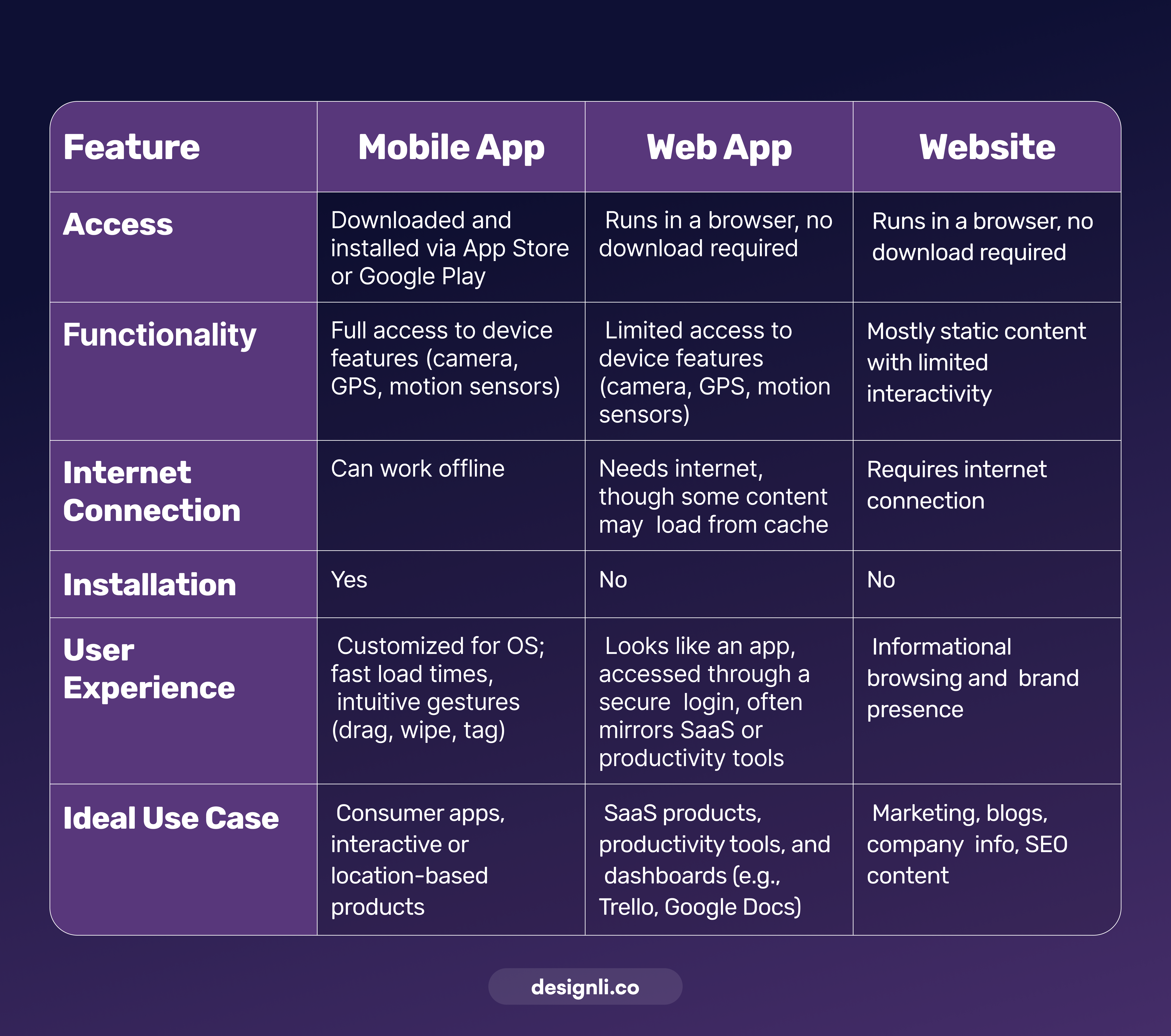
Mobile apps are downloaded and installed through an app store or marketplace, like Google Play or the App Store. These apps live and run on the device, and they may have access to the device resources and features like the camera function or GPS.
Web apps are often confused with mobile apps because they often look and feel a lot like them. However, there are some key differences that impact the functionality and usability.
A primary difference is that web apps are accessed through an internet browser. They can store data in your browser’s cache so some of the app can be accessed even when you’re offline. So, if you don’t have internet access, you are often unable to use the web app, or you will find your functionality is limited.
There’s no need to download or install web apps, as they aren’t local to the system. Another key difference between mobile apps and web apps is that web apps have limited access to device features, like GPS and the camera, which can limit some functionality, especially more advanced features you may want to build.
Web apps are specifically designed for interaction. The user logs in to a secure account and performs actions on the web app to accomplish a task, such as sending an email, creating a document, etc. So, although a web app functions like a website, it’s different in that a website is mostly static, and most content is publicly visible. Because users need secure accounts with a web app, they require authentication features.
Here's a quick comparison of how each option stacks up in terms of access, functionality, and use case:
Top Web & Mobile App Examples
Today’s best digital products often combine mobile apps, web apps, and websites based on how users engage.
- Google Docs: Web app with real-time editing and offline browser access.
- Trello: A task management web app that supports collaboration.
- Spotify: Mobile-first app with offline listening and personalization.
- Uber: Native mobile app offering real-time location-based services.
→ Want to see more? Check out our breakdown of 5 Great Web Application Examples and what makes them stand out.
Should you build a Web App, Website, or Mobile App?
Choosing the right build depends on how users interact with your product, not just budget. Do they need speed, offline access, or advanced device features? Or are they simply looking for information, fast?
Below, we break down the benefits of each format to help you align your tech choice with your product goals.
Benefits of a Web Apps and Responsive Websites
Though web apps aren’t built for each device, they are usually created using the “mobile-first” principle. The user experience is defined on mobile first, then scaled up to larger devices like tablets and desktops. Here are the benefits of a web app.
- Lower-cost development — Web apps cost less than mobile apps because they run on one codebase and don’t require multiple platform builds. Also, the development time required is less, and building it requires less specialized skills.
- Search Engine Visibility — Web apps can be indexed by Google, making it easier for people to find them when searching for a solution to their problem.
- Always up-to-date — Web apps and websites have a standard code base, which allows you to launch immediately and push updates directly to the server, so users consistently access the latest version.
- Wide Accessibility—Users can access web apps through the browser on any device, regardless of the operating system.
- Easy to launch—You do not need App Store or Google Play approvals to launch instantly from the browser. They have a fast speed-to-market.
- No installation required— Web apps run directly in the browser, so there’s no need to download anything. Users can open the app instantly and easily share content or features by copying and sending a link.
Benefits of a Mobile App
Mobile apps generally cost more to build than web apps. However, they offer some significant advantages for those ready to invest, with a few necessary trade-offs to consider:
- Enhanced functionality—Mobile apps provide access to a device’s built-in features, such as the camera, GPS, motion sensors, and local storage. This approach is ideal for interactive or location-based experiences.
- Stronger personalization — Apps offer tailored experiences based on a user’s behavior, preferences, and data, leading to higher satisfaction and usage.
- Push notifications—Reach users instantly with alerts, reminders, or promotions, driving engagement and retention.
- Promotional opportunities—Extend your reach to a broader audience by listing your mobile app in the App Store or Google Play.
- Offline access—Many mobile apps allow users to access core features without an internet connection, keeping the experience smooth even offline.
- Enhance user experience—Mobile apps are customized for the operating system, offering faster load times and smoother interactions.
- Custom UX & Gestures—Mobile apps offer more control over design and interaction, including drag, swipe, and tap, which provide innovative functionality and allow for highly intuitive user experiences.
What Should You Build?
Choosing the right platform for your digital product informs its trajectory. Making the best decision depends on clearly understanding your product’s potential budget, users’ behavior, and future steps in the business model.
Before deciding, ask yourself, what features does my product need?
Build a Mobile App if:→ You need offline access, push notifications, or GPS/camera use.
→ Your product requires a native and personal experience.
Choose a Web App if:→ You’re building a Startup or SaaS with an interactive dashboard or Client Management tool.
→ You want fast updates and browser access.
Opt for a Website if:→ Your goal is content, visibility, or SEO.
→ You don’t need a login or deep user interaction.
Need Help Choosing? Let’s Build What Matters
These are critical questions, and they deserve strategic, experience-backed answers.
If you're ready to move forward with clarity, you might be a good candidate for The Solution Lab, where our custom software development experts help you define the smartest path to launch. From the first conversation, we work alongside you to validate your product vision, define core functionality, and build a prototype that reflects user needs and business goals.
We align your MVP with your budget, timeline, and long-term growth potential through strategic planning, user-focused design, and technical guidance. You’ll leave The Solution Lab with a clear roadmap, a high-impact prototype, and the confidence to build only what matters most.
Let us help you pick the perfect platform for your idea; schedule a free consultation with Designli.


